
Quick Links
What is Employee Utilization Rate?
Employee utilization rate is the fundamental metric denoting the percentage of an employee's total available working hours actively spent on billable, revenue-generating tasks.
In our experience consulting for professional service agencies, it is the single most accurate predictor of an organization's overall profitability.
To measure this accurately, you must divide an employee's daily operations into two distinct categories:
- Billable Work: Time explicitly dedicated to client projects or services that the company can seamlessly invoice for revenue.
- Non-Billable Work: Essential internal tasks that keep the business operational but don't generate direct profit. This includes administrative duties, internal syncs, checking emails, and mandated training.
Why Tracking Employee Utilization Matters
Tracking this metric isn't just about micro-monitoring your workforce; it’s about ensuring the macro-health of your company.
Based on deep operational data, here are the three critical reasons organizations must measure utilization:
- Measures True Profitability: If your team consistently spends excessive time on non-billable deliverables, your margins will evaporate. Utilization rates instantly reveal if your service pricing models align with your team's operational reality.
- Improves Resource Management: Knowing everyone's exact capacity allows managers to intelligently distribute new work. It eliminates the guesswork when deciding who can absorb a new client account and who is already saturated.
- Prevents Impending Burnout: We frequently see organizations celebrate a 100% utilization rate—this is a dangerous mistake. Operating at maximum capacity leaves zero margin for administrative work or mental breaks, inevitably driving high turnover.
The Employee Utilization Rate Formula
Calculating the employee utilization rate requires immense accuracy, but the math itself is straightforward.
You only need two variables: the time the employee is available to work, and the time they actually spend executing client deliverables.
To get an accurate number, follow these three simple steps:
Step 1: Calculate Total Available Hours
First, figure out how many hours the employee is expected to work during a specific period (usually a week or a year). For a standard full-time employee, this is typically 40 hours per week.
Crucially, if they take paid time off (PTO) or sick leave, you must subtract those hours from their total available time baseline.
Step 2: Calculate Total Billable Hours
Next, aggregate all the hours the employee spent working directly on client or revenue-generating tasks during that same period.
You will need a rigid, daily time-tracking software framework to capture this accurately.
Step 3: Apply the Formula (With Example)
Let's look at a quick example to see how the math works in a real-world agency setting.
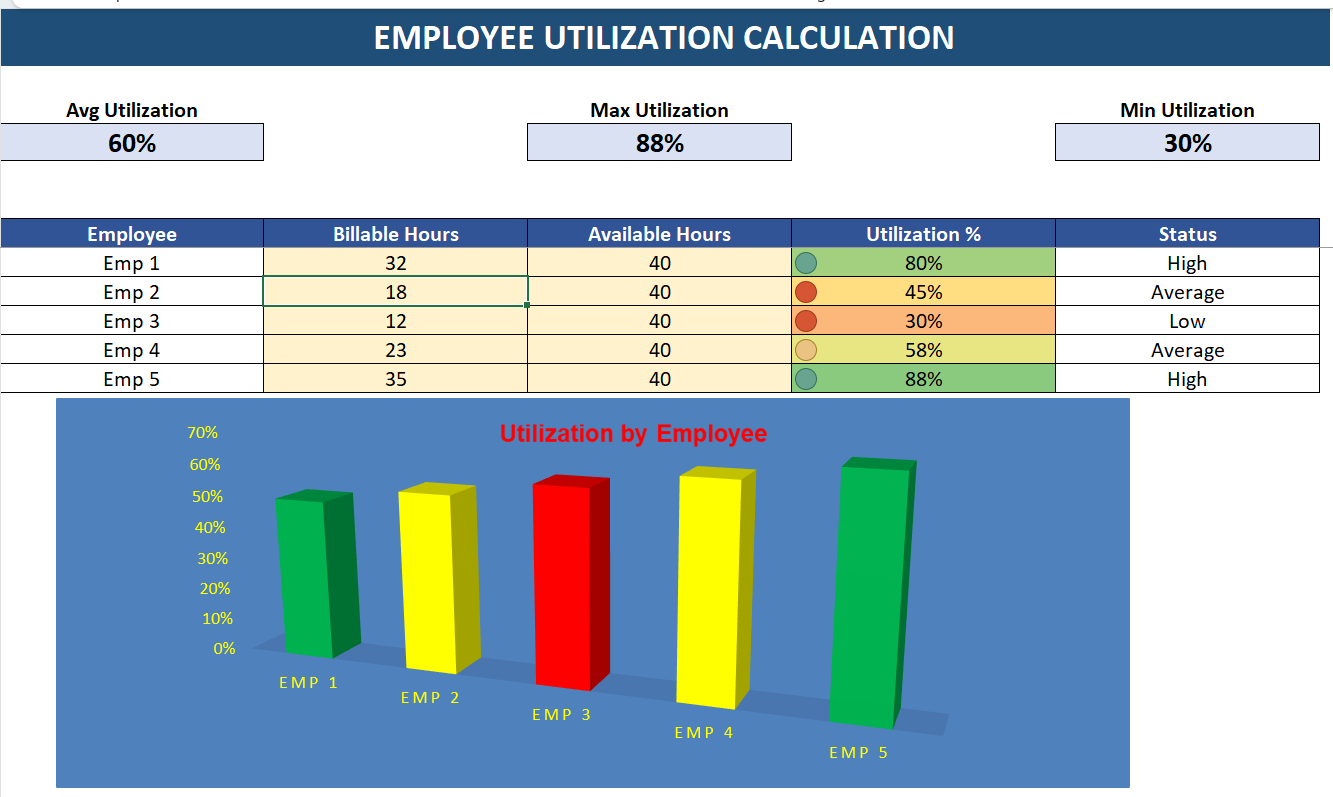
Imagine an employee, John, works a standard 40-hour week. During that week, he accurately tracks 32 hours of direct client work. The remaining 8 hours are spent answering internal emails and sitting in all-hands meetings.
- Total Billable Hours: 32
- Total Available Hours: 40
John's employee utilization rate for that week is an exceptionally healthy 80%.
What is a "Good" Utilization Rate? Industry Benchmarks
Once you calculate your rate, the logical next step is determining a target.
While inexperienced managers aim for 100%, an optimal utilization rate actually leaves a 15-30% buffer. A 100% capacity rate on billable tasks creates a fragile system where employees have absolutely no time for mandatory training, strategic breaks, or internal communication.
Instead, elite service-based businesses engineer their operations to hit an ideal utilization rate between 70% and 85%. This specific range is the operational "sweet spot." Here is how it breaks down across specific industries based on current market data:
- Top-Tier Consultancies & Law Firms: Usually target an aggressive 75% to 80% as the golden standard for partners and associates.
- Software Development & IT Agencies: Often aim closer to 70% to 75%, leaving a necessary buffer for technical debt management and continuous code learning.
- Creative & Marketing Agencies: Typically target 65% to 75%, explicitly recognizing that creative burnout requires a lower sustained capacity ceiling than standard hourly labor.
How to Improve Your Team's Utilization Rate
If your team's overarching utilization rate consistently degrades below the 70% threshold, it indicates systemic operational friction.
Here are three authoritative steps you can take to structurally improve this rate without overburdening your staff:
- Implement Asynchronous Communication: The biggest killer of billable time is the internal meeting. By replacing daily status meetings with asynchronous communication like Slack or Teams updates, we've repeatedly seen immediate 5-10% bumps in billable utilization.
- Eliminate "Shadow Admin" Tasks: Look for areas where highly-paid employees are doing low-leverage administrative work. Streamlining internal approval processes and using integrated PM tools (like Jira or Asana) frees up massive blocks of revenue-generating time.
- Improve Project Scoping Accuracy: Inaccurate initial estimates often result in team members spending far more time on a task than allocated, directly destroying utilization projections. Analyze past historical data to vastly improve how you scope and sell future retainers.
Conclusion
Mastering how to accurately calculate employee utilization is absolutely essential for running a profitable and sustainable business matrix.
By consistently tracking the delicate equilibrium between billable and non-billable hours using the (Total Billable Hours / Total Available Hours) x 100 equation, senior leadership can execute data-driven decisions regarding resource allocation, project pricing frameworks, and hiring pipelines.
Always prioritize long-term sustainability, purposefully keeping your team's utilization rates safely within the 70% to 85% range to secure consistent profitability without sacrificing high employee retention.
Frequently Asked Questions (FAQ)
What is the difference between realization rate and utilization rate?
Utilization rate measures how much of an employee's time is spent on billable work (e.g., 32 out of 40 hours).
Realization rate measures how much of that billable work was actually paid for by the client after discounts, write-offs, or fixed-fee budget overruns. You can have 100% utilization but only 50% realization if your projects are severely underpriced.
Should managers have the same utilization rate target as junior staff?
No. Senior managers, directors, and partners naturally require significantly more time for administrative duties, team mentoring, and business development.
While a junior employee might have an 85% utilization target, a senior manager's target should typically fall between 30% and 50%.
How do you calculate utilization rate with PTO (Paid Time Off)?
When calculating utilization, PTO and holidays should be subtracted from the "Total Available Hours."
For example, if an employee takes 8 hours of PTO in a 40-hour week, their new Total Available Hours becomes 32. If they billed 24 hours that week, their utilization rate is (24 / 32) * 100 = 75%, resulting in a much more accurate reflection of their efficiency while actually at work.